A personal LLM at home
I wanted an LLM server at home and finally made the decision to do just that. Lots of experimentation and keyboard clicks later, I got a local LLM server up and running for my wife & me!

Hardware specs & shopping list
It is a fairly humble rig among self-hosters I’d say, here is the spec sheet:
- CPU ryzen 5600x
- 32GB ddr4
- 2tb NVME
- 2x RTX 3090
- 1200W PSU
- Open air mining rig
- cooling:
- 3x 120mm fans
- AXP-90 X47 Full Copper
I landed on this spec mostly because I had most of the parts lying around. I had already transformed an old desktop into a homelab server. But more importantly, like most others I considered two avenues of hardware for inference:
- GPUs (vram, king for speed and performance)
- Unified memory options (DGX Spark, Mac minis etc)
For me it was a fairly quick decision. I will use it for agentic coding, hence I need fast prefill and decode, it simply won’t be usable otherwise. Given that and some experimenting, I found that I need to hit 40+ tokens/s on decode and ~1000 tokens/s on prefill, I checked which models I wanted to run (and could) landed on dense models such as Gemma 4 31b and Qwen 3.6 27b. With dense models unified memory options go out of the window from the get go as the bandwidth of these are usually too slow or far too expensive for me. So GPUs it is, then you can choose a manufacturer:
- Nvidia, no hassle and the default, mostly due to CUDA
- AMD, economical option and decent support with ROCm
- Intel, the newest kid on the block, interesting if you want to tinker
Given I am an AI/ML engineer, having CUDA is nice regardless of LLMs so the decision was easy here as well. Then next, which GPU? For this what matters most is memory bandwidth and how much memory (VRAM) you have available, and to a degree the compute of the card. The more you can get per card the better, yes you can do cross GPU but that comes with its own intricacies.
I would have loved the RTX 6000, sadly, way out of budget, next on the list is the RTX 5090, which would have been possible but in the end I settled on the dual 3090. Mostly because it came down to this:
- $2000 dual 3090: 1.9 TB/s combined on paper, closer to 900 GB/s effective as the cards have to sync over PCIe, 48 GB VRAM.
- $4000 singular 5090: 1.8 TB/s bandwidth, 32 GB VRAM, NVFP4 support.
The 5090 is a sweet option if it was just me but I want to be able to support 2 concurrent requests with ~100k context minimum in q4 quantization, as I intend to have two users of which each can run one coding agent (Pi etc) of lets say 100k each with kv cache fully sitting in VRAM. Based on my rough estimations, I need the 48 GB VRAM for this given my wishlist and wiggle room.
The software part
You’d think having the server is most of the work and done(it was in its own right and more on that later) but it’s actually the software where you can lose and win a lot depending on your use case.
I started out with llama.cpp like most others I assume, and long story short, it’s great for single users but sub-optimal for concurrent requests. Additionally, to my knowledge this is also not what large providers use such as Together.ai and others. I’d like to also gain some practical knowledge regarding production inference of LLMs.
After a bit of research I swapped over to vllm which is amazing (also love their blog, highly recommend giving it a read).
It is a bit more setup work, tinkering with configs and model formats. But once you got it up and running, it’s flying!
After finding vllm (and it indeed takes some tinkering depending on your hardware, models and use cases) I found a community/repo that deals with exactly that: club-3090 which made this process heaps easier.
Now the server more than lives up to my requirements, 4 concurrent requests in int4 with ~100k context each. fp8 is possible too with about ~145k with 2 concurrent requests.
In case you are interested these are the final launch params (updated recently):
| |
Note that this comes with patches by
club-3090to optimize for older hardware such as mine. It also runs int8 activations (W4A8) through theVLLM_MARLIN_INPUT_DTYPE=int8environment variable, whichclub-3090sets for you and which is why it does not show up in the launch params above. The--dtype bfloat16flag is the base dtype for everything outside the quantized kernels, so the two go hand in hand rather than contradicting each other.
Now there is a lot more to discuss here, kv cache, prefill, decode, drafting techniques and how hardware interacts with these. However that would make this into a lengthy post and therefore I shall do a follow up post going over these topics.
Cooling
 I have a little Grafana dashboard hooked up to the server where I can monitor the server and vLLM service. There are a bunch of parts I monitor there such as kvcache rate, kv pool usage, evictions, requests queueing, GPU temps, Wattage usage and so on. One of the first things I found is that the GPUs run hot, as in 95 Celsius hot.
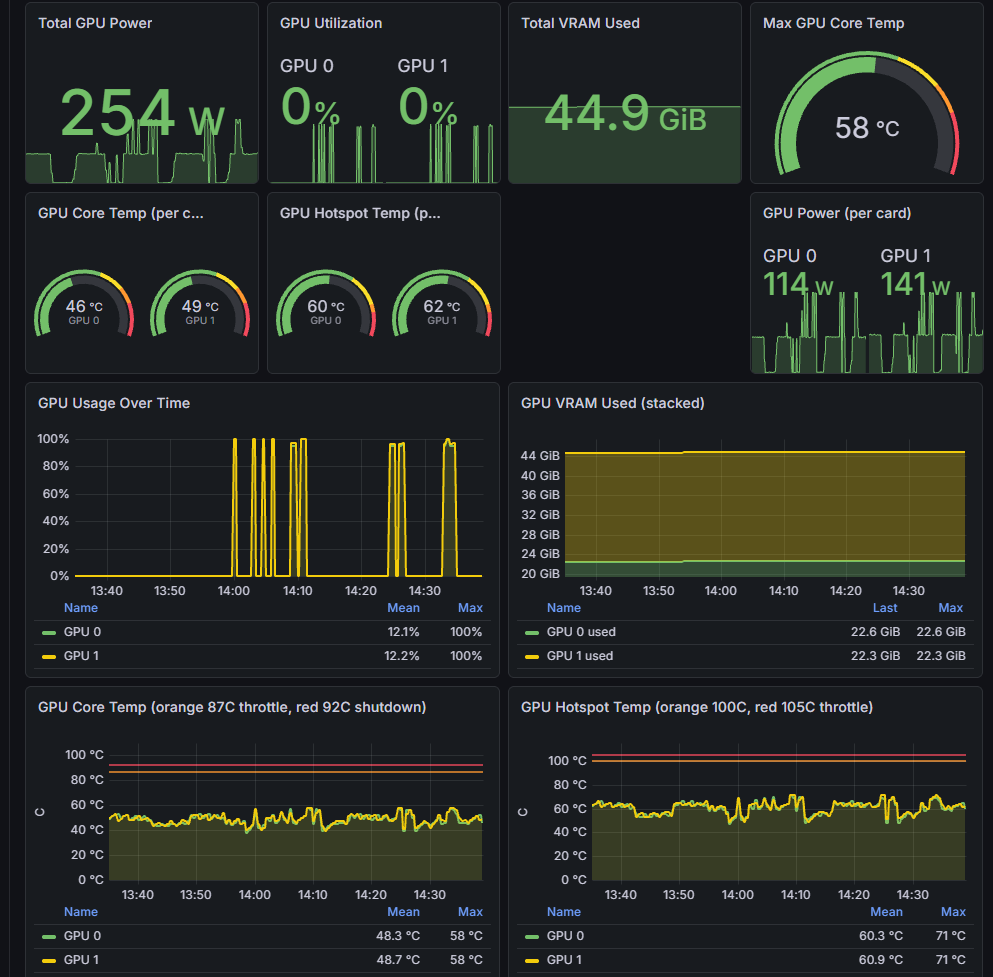
Not surprising since GDDR6X is widely considered to run hot but given that I intend to use these GPUs as a server I expect some fairly constant load, so I’d like to bring down these temperatures.
Repasting & repadding
The two RTX 3090 GPUs I have were bought second hand, and therefore are several years old. They run notoriously hot, especially the memory. There are a couple of ways to bring this down, namely repadding and repasting. Repadding is the process of taking apart the cards’ shrouds and replacing the thermal pads, repasting is replacing the paste on the GPU main chip. It is a rather tedious task to do if you have never done it before, and it differs for each GPU model and these pads come in several thicknesses, you have to get the right ones in order for it to be effective. In my case a youtube video had the specifications I was looking for.
I have repadded both, here is a small picture mid replacement:
They both needed it, one especially had pads almost rock hard at this point, which means they are far too old and need replacing. Whilst I was at it I repasted the main chips too.
Cases, fans & power limiting
Originally I reused my old desktop case, this turned out terrible due to airflow. It’s a relatively small case for two large GPUs. One GPU was basically blowing hot air on the other and this made one GPU run 15 degrees hotter than the first GPU. I figured with better airflow we can resolve this. I tried a couple of fan setups, made no real difference under load.
Eventually I got a bigger case that I had a good experience with previously, extra fans but still not the ideal temperatures I’d like to see. In the end, many fan configurations later, I opted for an open-air case.
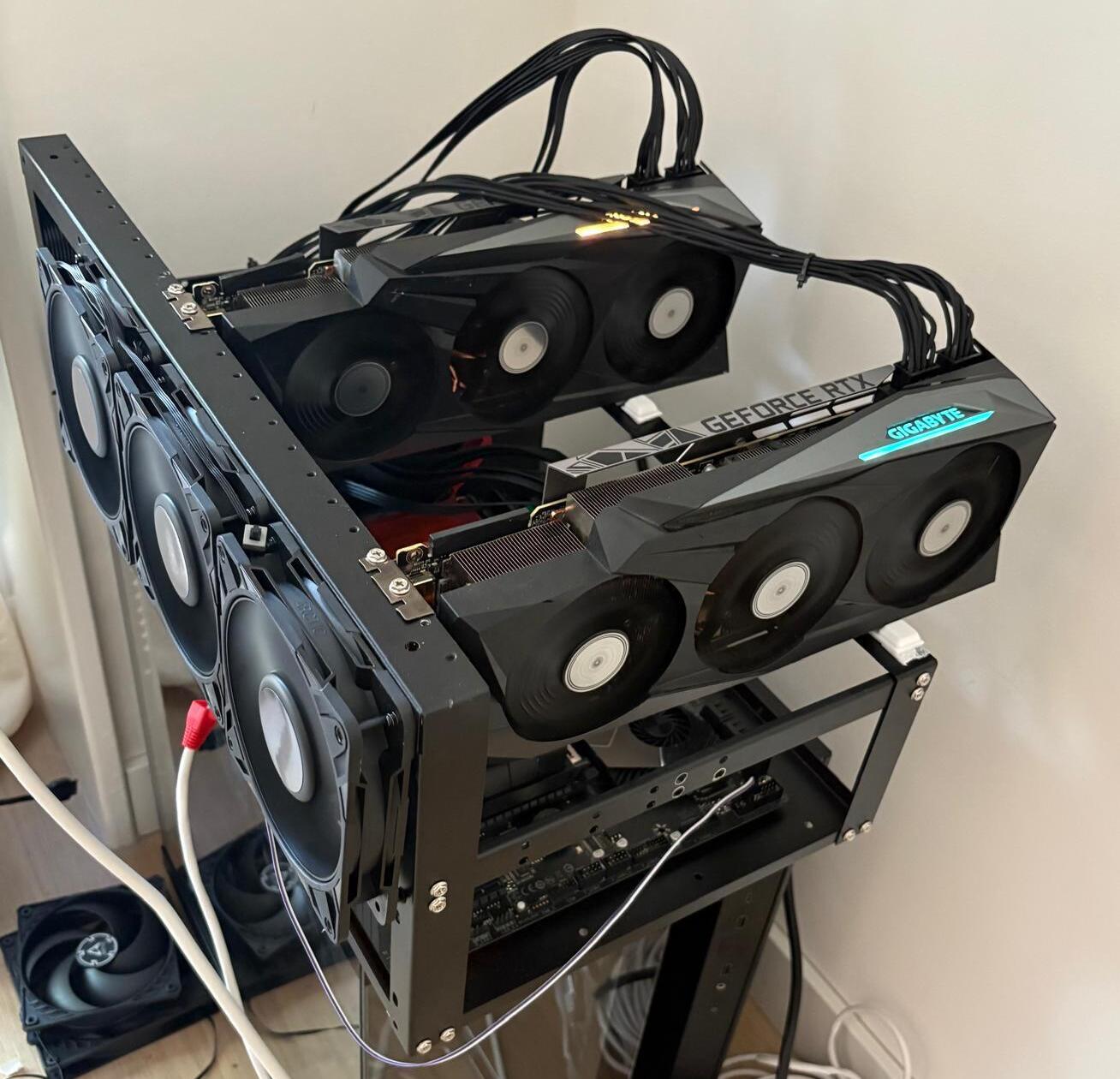
This one did the trick! I rarely ever see the cards go above 75 °C, to be safe I have limited them to 250W as this gives a minimal performance impact but a great temperature reduction.
The fun part, choosing a model
Next up is the fun part, which model(s) you end up using. Most open source models are aimed at specific tasks, some models excel at writing, others at writing code, some in legal tasks and the list continues. These usually get released by larger companies such as Google, MoonshotAI and many more. These models are great as is but more often than not you will likely host a model because you have specific needs, and most likely there will be benchmarks published for the kind of tasks you have in mind.
In my case I am mostly interested in coding related work. There are many benchmarks for this, I imagine this is mostly because it is one of the fields, if not the field, that LLMs have had the largest impact. This is for a variety of reasons but in my opinion it’s likely because:
- It’s fully digital & a large market
- Verifiable rewards are relatively easily available for code
- Training data is published online in great volume.
I’ve used many model families and their variations but the one I chose was Qwen 3.6 / 3.8 27b. As those who have used this model will know is that it tends to over think quite a bit, meaning it reasons more then you’d like.
Disabling thinking would hurt model performance but luckily there are labs and open source contributors who try to resolve that through post-training the model more to reduce over thinking. One I’ve personally enjoyed is ThinkingCap by BottleCapAI and recently they have also done a 3.8 release but it’s less permissive license wise. For cards like mine there is a handy INT4 AutoRound build of it by wasifb.
There are more options out there and recently I have been testing this Pi harness fine tuned version as Pi is my coding harness of choice. As you can see, choosing a model, and more specifically, its fine tunes can be quite the rabbit hole and I revisit this step every now and then as it can give nice performance boosts without much effort from my side.
The final result (recently updated)
Qwen3.8-27B · 2× RTX 3090 · vLLM v0.32.0
Setup
| Setting | Value |
|---|---|
| Model | Qwen3.8-27B INT4 AutoRound · W4A8 · MTP n=4 |
| Checkpoint | Frozenlock/Qwen3.8-27B-int4-AutoRound |
| GPUs | 2× RTX 3090 24 GB · TP=2 · PCIe |
| VRAM in use | 45.9 GB |
| KV cache | fp8 · pool 553,859 tok |
Throughput
| Metric | Result |
|---|---|
| Prefill — single stream @ 100K | 1,436 tok/s (cold, uncached) |
| Decode — 4× 100K, per stream | 53.6 tok/s |
| Decode — 4× 100K, aggregate | 179 tok/s |
The aggregate is measured over the full round wall clock, including prefill and the staggered starts, whilst per stream is decode only, so the two numbers do not add up.
Which comfortably covers my earlier requirements of 40+ tokens/s on decode and ~1000 tokens/s on prefill, with room to spare for the both of us.
Why use open source when closed source frontier models are so much better?
Generally speaking this is true, and you can get amazing work done with closed source frontier models. However a question to also ask is: “Do I need frontier level intelligence from LLMs?”
If we look back most people found last years models amazing to use and people were enthusiastic. That is still true today with most new model releases but I’d also argue that for most tasks today, frontier-level intelligence is absolutely overkill or in some cases a luxury.
For perspective, if we take qwen 3.8 27b, and compare it to models I have used 6 months ago, 12 months ago and a couple of years, it is rather amazing to see how well it scores!
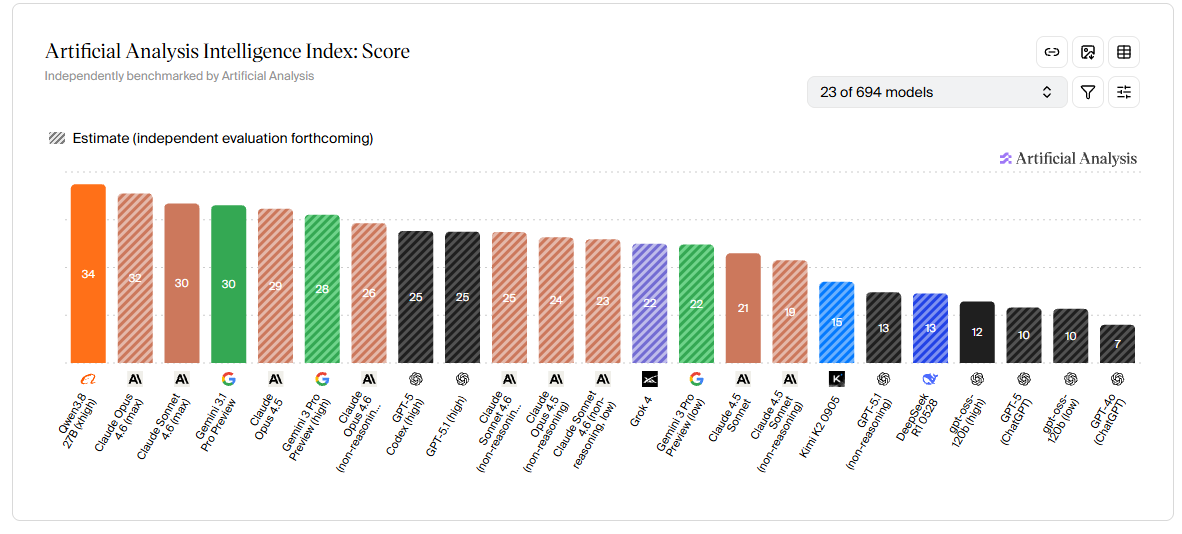
Now scores != performance (benchmaxxing and all) and it will differ from person to person and what kind of work they will try to do with the LLM of their choice but regardless it is a decent proxy and indication.
Tiny backstory
I remember when I first got access to GPT3.5, I’m sure I got to play around with LLMs and such before that time but they were not nearly as memorable. GPT 3.5 was the first time it felt genuinely useful for everyday tasks, took the world by storm overnight and put OpenAI on the map for the general public.
Which is an interesting look back given how wide the gap has gotten between GPT3.5 and the latest frontier models. As GPT 3.5 took over the world, a similar-ish phenomenon happened in December 2025 when all of a sudden many engineers started to pick up agentic coding, at least in my circle. And when we take a look at a rough proxy, Claude Code commits really started to pick up after December, most of this was done with the release of Opus 4.5.
In January and February there was a lot of talk in my circles at work and with friends about agentic coding, some loving it some considering it a slowdown, endless reports being published with “Does AI make software engineers more productive?”.
Today that discussion has shifted, most people now use agentic coding, either through CI for bug catching for PRs, debugging production cases, and making new features getting an agent review in before a human colleague reviews, and it continues. Most of the conversation now is more about how to use it, not if it makes one more productive or not.
My take away of all this is that LLMs are now far more ingrained into software engineering work than ever before and this does not seem to go away, with one caveat. Most tools that we share across professions in software engineering are mostly open source or not really dependent on external sources, IDEs, terminals and you can self host just about anything for a low budget, all being privacy friendly and no difficult barriers of entry. But with agentic coding this is not true, sure it is easy, get a Claude subscription, install Claude Code and good to go.
But either way, in most cases you have to use an external API that gets access to sensitive data like never before. Not a big fan of that but more importantly having an LLM available as a SWE has become almost as standard as having an IDE is now.
So, was it all worth it?
A 27B model on two 6 year old GPUs is now genuinely useful for my everyday tasks, and my data does not leave my house.
Sneak peek at the next post
Another problem I ran into: concurrency. With two people on the server it suddenly matters what compute runs when, one user fires off a large prefill and the other watches their tokens crawl. The next post will go over:
- PCIe and data transfer, what is actually moving between the cards and when
- What compute runs when, prefill and decode have very different appetites
- Prefill decode disaggregation versus user isolation, two ways to keep users from stepping on each other